<?xml version="1.0" encoding="utf-8"?><feed xmlns="http://www.w3.org/2005/Atom" ><generator uri="https://jekyllrb.com/" version="3.10.0">Jekyll</generator><link href="https://31daysofvibecoding.com/feed.xml" rel="self" type="application/atom+xml" /><link href="https://31daysofvibecoding.com/" rel="alternate" type="text/html" /><updated>2026-08-16T01:19:47-04:00</updated><id>https://31daysofvibecoding.com/feed.xml</id><title type="html">31 Days of Vibe Coding</title><subtitle>Learn to ship production features faster with AI. Real tactics from building collectyourcards.com - no hype, no theory, just what actually works.</subtitle><entry><title type="html">Walking With Claude</title><link href="https://31daysofvibecoding.com/blog/2026/03/06/walking-with-claude/" rel="alternate" type="text/html" title="Walking With Claude" /><published>2026-03-06T00:00:00-05:00</published><updated>2026-03-06T00:00:00-05:00</updated><id>https://31daysofvibecoding.com/blog/2026/03/06/walking-with-claude</id><content type="html" xml:base="https://31daysofvibecoding.com/blog/2026/03/06/walking-with-claude/"><![CDATA[<p><img src="https://assets.buttondown.email/images/f5c75044-8af2-4db5-b066-6b6109761704.png?w=960&amp;fit=max" alt="" /></p>

<p>I’ve noticed that since I started my journey into AI-driven software development, I’ve almost entirely stopped going for long walks for exercise. Some of this was the cold weather, but most of it was the dopamine.</p>

<p>“Just one more feature.”</p>

<p>I always wanted to stay close to my machine, because it would regularly ask me for permissions, or a clarifying question, and I didn’t want to waste the time it might wait for.</p>

<p>I’ve been telling myself for months that I should figure out how to configure my machine to allow remote access from my phone. That way, I could kick off new features from the couch, from the car, or even on a walk.</p>

<p>So I spent some time last weekend doing some research to see how others had approached this problem. And that’s when I discovered <a href="https://code.claude.com/docs/en/remote-control">Claude’s “/remote-control”</a> feature that had literally only been released 4 days earlier.</p>

<p>A video makes a much better illustration of how this works, click the image below to see it.</p>

<p><img src="https://assets.buttondown.email/images/0532b3be-23c0-42e5-b791-93910eb50549.png?w=960&amp;fit=max" alt="" /></p>

<p>So if I can get a 2 or 3 mile walk in, while also making progress developing software? Game changed.</p>]]></content><author><name>Jeff Blankenburg</name></author><category term="blog" /><summary type="html"><![CDATA[Writing code from the comfort of anywhere]]></summary></entry><entry><title type="html">My First Big Test</title><link href="https://31daysofvibecoding.com/blog/2026/02/27/my-first-big-test/" rel="alternate" type="text/html" title="My First Big Test" /><published>2026-02-27T00:00:00-05:00</published><updated>2026-02-27T00:00:00-05:00</updated><id>https://31daysofvibecoding.com/blog/2026/02/27/my-first-big-test</id><content type="html" xml:base="https://31daysofvibecoding.com/blog/2026/02/27/my-first-big-test/"><![CDATA[<p><img src="https://assets.buttondown.email/images/c0bd3e3a-3bca-4acf-93b2-3306d5a6c469.png?w=960&amp;fit=max" alt="" /></p>

<p>I’ve been vibe coding apps for the last 10 months almost daily, at least according to my GitHub activity.</p>

<p>But May 1 will be my first big test.</p>

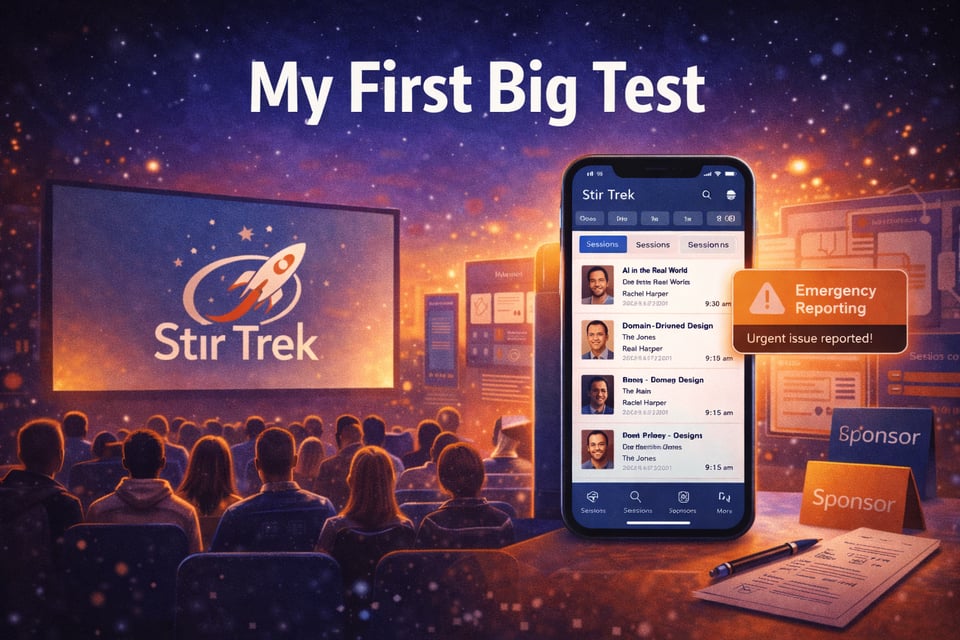
<p>In addition to everything else, I also run a software development conference called <a href="https://stirtrek.com/">Stir Trek</a> here in Columbus, OH. This will be the 17th year for the event, and the first time we will have an app for attendees.</p>

<p>For a team of 10 volunteers, building a cross-platform app with all of the data and capabilities necessary to serve 1,600+ attendees was just too much to take on. Until now.</p>

<p>This weekend, I’ll be building a complete app, from start to finish, that provides the following capabilities:</p>

<ul>
  <li>Full schedule view, with “build your schedule” capability.</li>
  <li>Speaker photos, names, and bios linked to their talks.</li>
  <li>Sponsor listings, with links to their websites.</li>
  <li>Dynamic polling throughout the event.</li>
  <li>Session review capabilities, for speaker feedback.</li>
  <li>Venue map (the event is held in a large movie theater)</li>
  <li>Emergency Reporting</li>
</ul>

<p>I want to spend a little time talking about the emergency reporting feature, because I believe this is the most important one. There are some important issues, like audio/visual problems, that are useful to know about as they’re happening. You don’t want to wait for people to complain after a session, you want to fix it immediately.</p>

<p>But any time you gather a few thousand humans together, there’s the potential for bad behavior. Harrassment. Aggression. Frustration. We want a way for our attendees to feel safe, to feel heard, to feel like they have a team of people listening and ready to help if they’re uncomfortable.</p>

<p>This emergency reporting line is there for anyone, that needs anything during our event. Help. Guidance. Assistance. Safety. Medical Attention.</p>

<p>This <strong>has</strong> to work. It has to work reliably. It has to work reliably every single time.</p>

<p>May 1st is my first true test with vibe coding.</p>]]></content><author><name>Jeff Blankenburg</name></author><category term="blog" /><summary type="html"><![CDATA[An app in production, and soon.]]></summary></entry><entry><title type="html">Building Bro Madness</title><link href="https://31daysofvibecoding.com/blog/2026/02/20/building-bro-madness/" rel="alternate" type="text/html" title="Building Bro Madness" /><published>2026-02-20T00:00:00-05:00</published><updated>2026-02-20T00:00:00-05:00</updated><id>https://31daysofvibecoding.com/blog/2026/02/20/building-bro-madness</id><content type="html" xml:base="https://31daysofvibecoding.com/blog/2026/02/20/building-bro-madness/"><![CDATA[<p><img src="https://assets.buttondown.email/images/ae59cdda-c4d2-4770-a765-b9dc18abd478.png?w=960&amp;fit=max" alt="image.png" /></p>

<p>Last week, I talked about how quickly I was able to create a scoring app for a card game. I had a similar experience this week.</p>

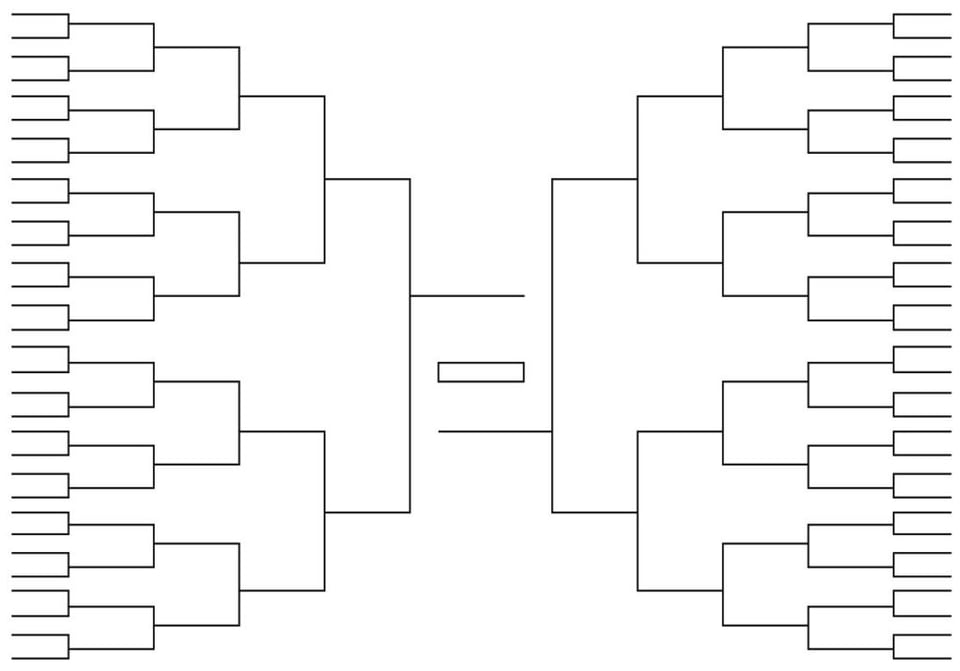
<p>Next month in the United States, the college basketball tournament starts. The best 64 teams play 63 games to determine a champion.</p>

<figure><img src="https://assets.buttondown.email/images/4b695f6e-f2b4-45f6-a4d2-c8d5033522cc.png?w=960&amp;fit=max" draggable="false" /><figcaption>A standard bracket for the tournament</figcaption></figure>

<p>The most fun part of this tournament for me is the first weekend of games. Thursday: 16 games. Friday: 16 games. Saturday: 8 games. Sunday: 8 games. This eliminates 75% of the teams from the tournament.</p>

<p>Each year, 25 of my friends rent a giant cabin, and spend the weekend watching those 48 weekend games. Lots of wagers and games take place as a result, and those games have all traditionally been entered and managed on paper.</p>

<p>It felt like this was an opportunity to use AI to build an app that would make all of these games much simpler to administer and score, but also a way to have everyone connect with each other before the tournament as well.</p>

<p>Here are some of the things that amazed me while building this app.</p>

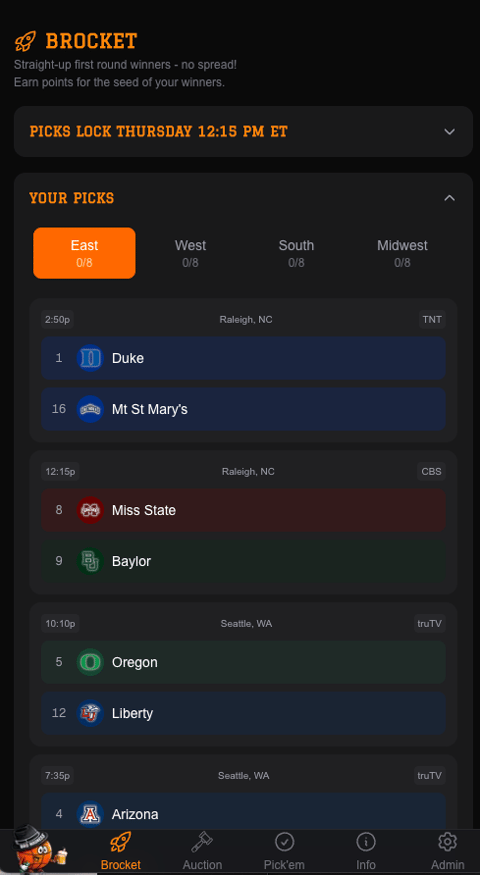
<h3 id="i-didnt-have-to-explain-the-bracket-concept-at-all">I didn’t have to explain the bracket concept at all.</h3>
<p>With my simple prompt, it was able to establish that there are 4 regions, winning teams flow from one game to the next, and those regions meet in a final four.</p>

<p><img src="https://assets.buttondown.email/images/72be4479-8eec-4d84-98aa-2ce75240d28a.png?w=480&amp;fit=max" alt="image.png" /></p>

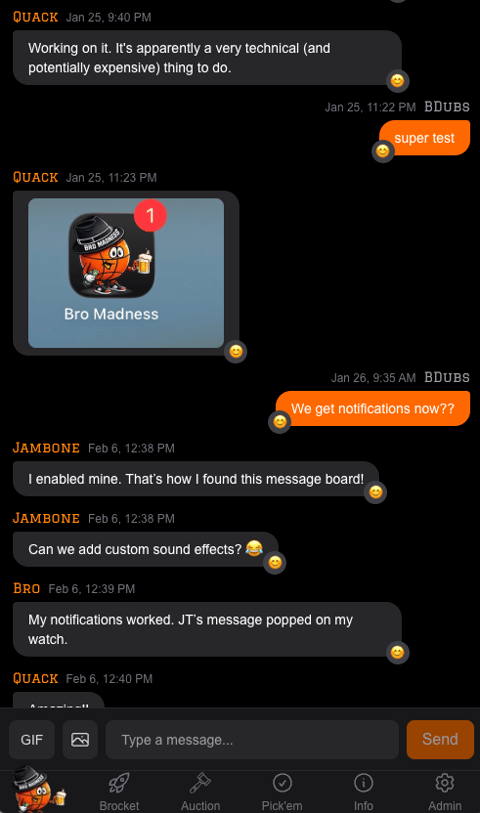
<h3 id="i-wanted-chat-features-with-notifications-and-emoji">I wanted chat features, with notifications and emoji.</h3>
<p>Claude was able to build a really compelling chat that is pretty similar to iMessage.  It was even able to add Giphy support.</p>

<p><img src="https://assets.buttondown.email/images/b72d3656-13ca-4da0-a452-b9713f6a9da2.png?w=480&amp;fit=max" alt="image.png" /></p>

<h3 id="administration-tools-were-the-most-impressive">Administration Tools were the most impressive</h3>
<p>I asked for a set of administrative tools that would allow things like game score updates. Tools to manage the data the games needed.  What I didn’t expect:</p>

<ul>
  <li>Full user management, including marking payments for each contest.</li>
  <li>Trip cost management. I can mark, in several installments if necessary, how much a user has paid for their trip.</li>
  <li>The system automatically calculates payouts for contests, and gives me a place to mark that I’ve paid the winner.</li>
  <li>A tool to enter the weekend’s menu options for each meal.  No more “what’s for dinner tonight?”</li>
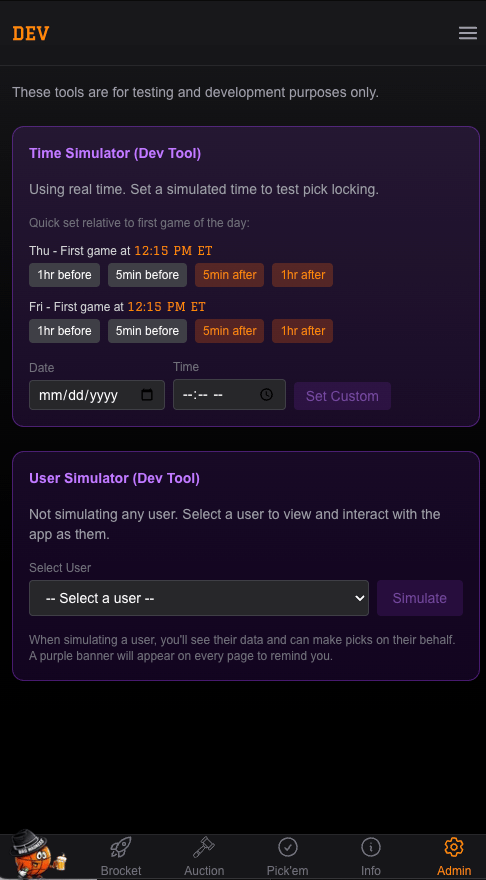
  <li>Two powerful dev tools. The first is a time simulator, so that I can see what the app will look like at specific moments.  For example, did the picks lock after the first game started?  Did the default menu update when the day changed?</li>
  <li>The second dev tool is a user simulator.  This allows me to use the site as any user of the system.  If someone can’t or won’t use the site, I can still go in and enter their picks for them.  I can see what they see in real time.</li>
</ul>

<p><img src="https://assets.buttondown.email/images/d29f1eba-2ed4-4492-8cf2-1f7a5795e425.png?w=960&amp;fit=max" alt="image.png" /></p>

<p>The tournament starts on March 19th.  Can’t wait to see how this performs!</p>]]></content><author><name>Jeff Blankenburg</name></author><category term="blog" /><summary type="html"><![CDATA[Building an app to watch March Madness.]]></summary></entry><entry><title type="html">Card Games</title><link href="https://31daysofvibecoding.com/blog/2026/02/13/weekly-update/" rel="alternate" type="text/html" title="Card Games" /><published>2026-02-13T00:00:00-05:00</published><updated>2026-02-13T00:00:00-05:00</updated><id>https://31daysofvibecoding.com/blog/2026/02/13/weekly-update</id><content type="html" xml:base="https://31daysofvibecoding.com/blog/2026/02/13/weekly-update/"><![CDATA[<p>I spent the weekend with some old friends and all of our children in a tradition we call “No Moms Weekend.” It’s 7 dads, and 15 kids of varying ages all doing wintery outdoor activities like hiking, making campfires, and playing lots of games. Moms have to stay home and suffer through the peace and quiet of an empty house.</p>

<p>One of our favorite games to play is called Backalley. It’s a trick-taking card game played with a standard 52-card deck. It always involves 5 players, and it’s played in 20 rounds. The first round every player gets 10 cards, then 9, then 8, until you get down to 1. Then you repeat the entire process back up to 10. There are some important data points to record for each round as we play:</p>

<ul>
  <li>How many tricks did each player think they would win this round (bids)?</li>
  <li>How many total bids were made?</li>
  <li>How many tricks did each player actually win?</li>
  <li>What was the trump suit?</li>
  <li>What is the user’s score?</li>
</ul>

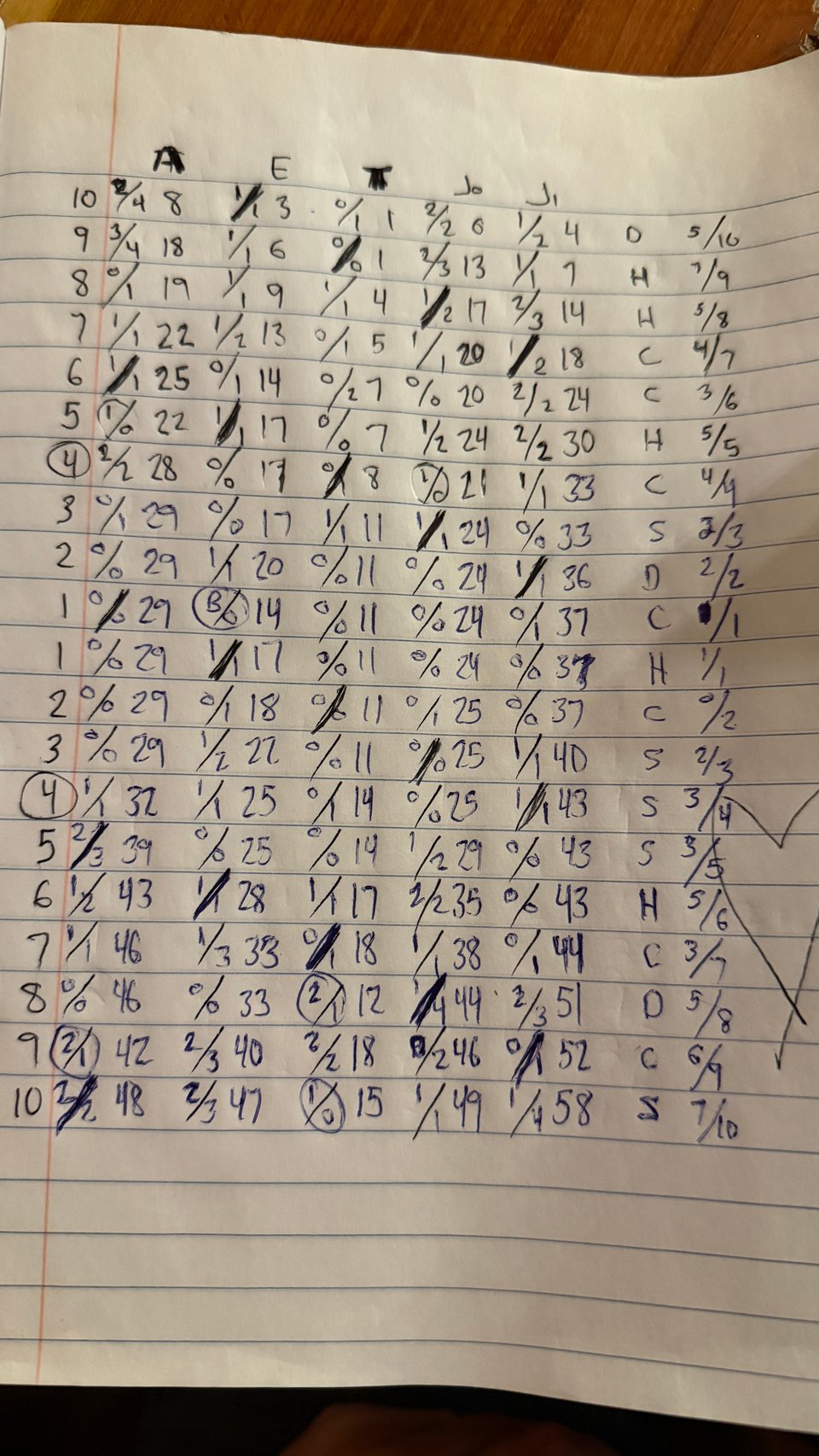
<p>Here’s what a standard scoring table (on paper) might look like:</p>

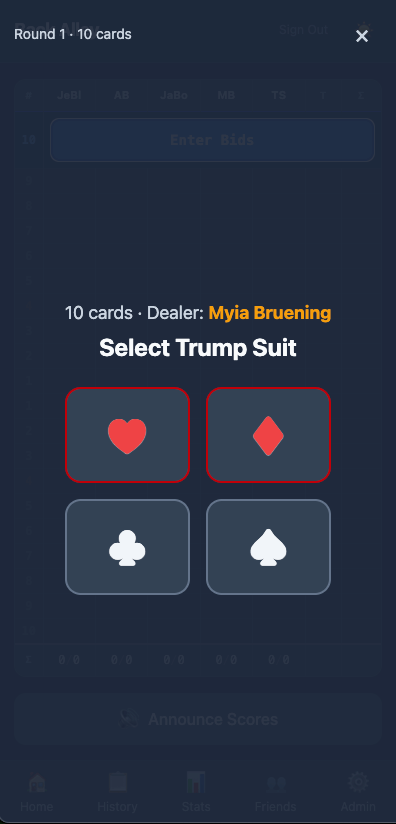
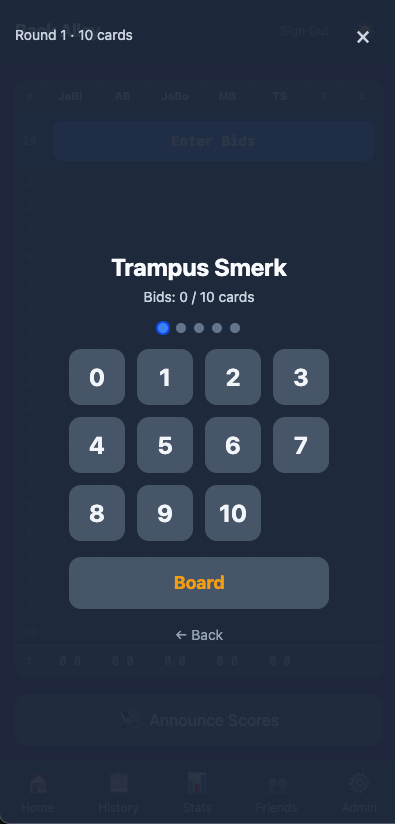
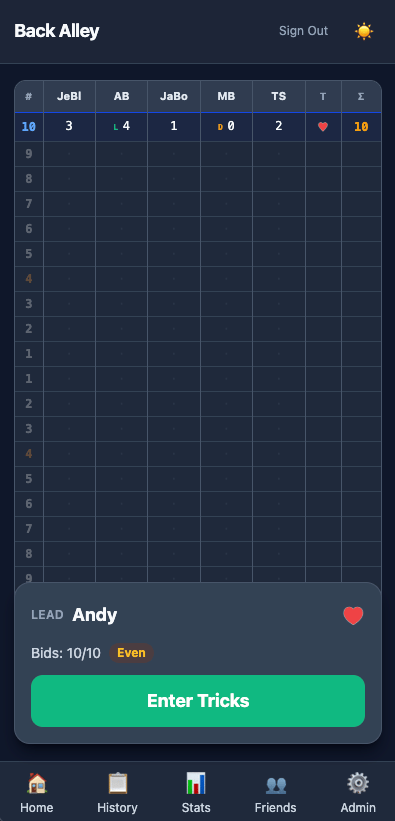
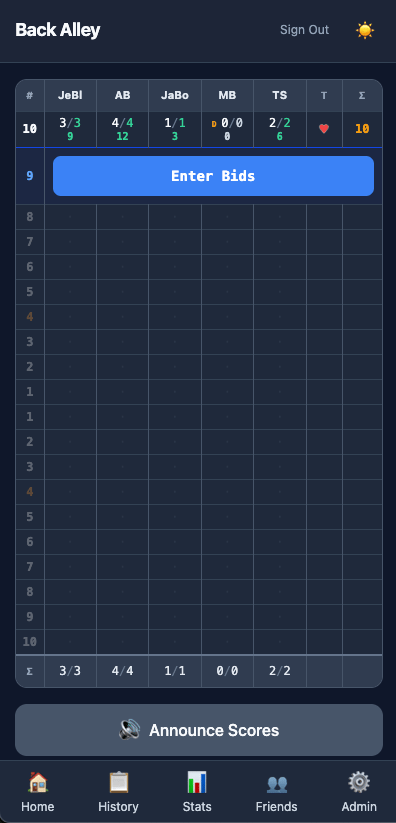
<figure><img src="https://assets.buttondown.email/images/8c313869-025e-4a78-8782-86bc0f198503.jpeg?w=960&amp;fit=max" draggable="false" /><figcaption>A backalley score sheet</figcaption></figure>

<p>I mentioned to the group that this seemed like something I could probably have Claude build for us in the time it took to play a game. So I did.</p>

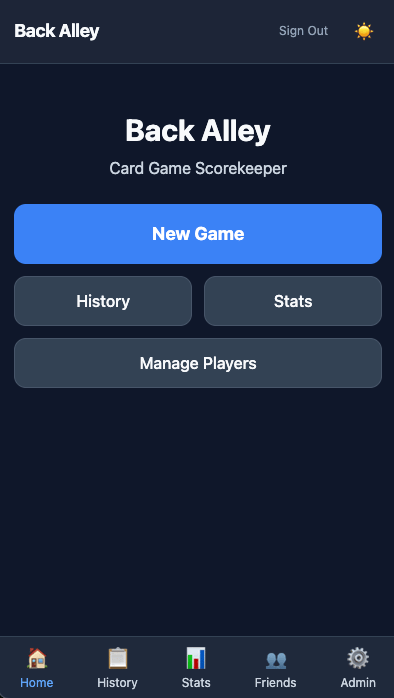
<p><a href="https://backalleyscore.com">https://backalleyscore.com</a></p>

<figure><img src="https://assets.buttondown.email/images/e3fa88ba-5900-4b46-8b2c-3f18512886a0.png?w=960&amp;fit=max" draggable="false" /><figcaption>Home Screen</figcaption></figure>
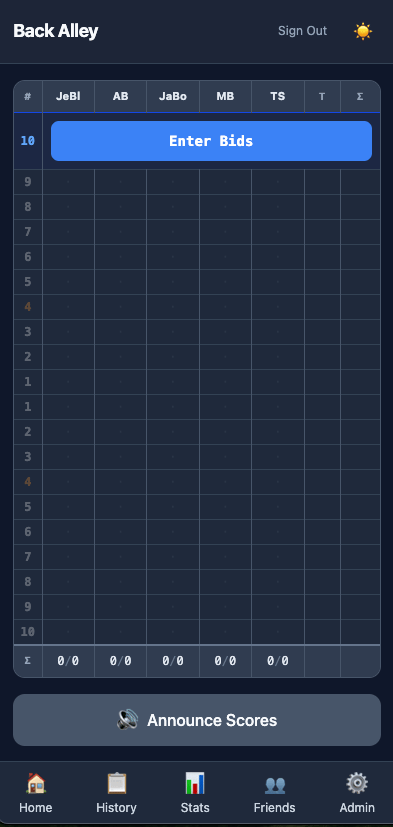
<figure><img src="https://assets.buttondown.email/images/b5801d40-92a5-46a4-ba06-3cc51a25f88b.png?w=960&amp;fit=max" draggable="false" /><figcaption>Empty Scoresheet</figcaption></figure>
<figure><img src="https://assets.buttondown.email/images/6bc6e960-9f1b-4649-9ae2-e5da14a9c4f7.png?w=960&amp;fit=max" draggable="false" /><figcaption>Trump Suit Selection &amp; Dealer Indication</figcaption></figure>
<figure><img src="https://assets.buttondown.email/images/37beaa89-a279-4d78-80f0-8567d6c6b284.png?w=960&amp;fit=max" draggable="false" /><figcaption>Bid Entry</figcaption></figure>
<figure><img src="https://assets.buttondown.email/images/c3ea740a-c517-46d6-b7c7-9c649553c682.png?w=960&amp;fit=max" draggable="false" /><figcaption>Bids Complete</figcaption></figure>
<figure><img src="https://assets.buttondown.email/images/1acc93a4-87a5-4063-a37c-ee746cc7ff9f.png?w=960&amp;fit=max" draggable="false" /><figcaption>First Round Complete</figcaption></figure>

<h2 id="things-i-learned">Things I Learned</h2>

<p>One of the most amazing things I discovered in this process was how good Claude was at interpreting that hand-written image above. We had already talked through some of the rules of the game, but it was able to identify all of the different components, and use that drawing as a template for what our digital scoresheet became. It makes me think I could be drawing pictures to describe my interfaces when words aren’t getting me where I want to be.</p>

<p>For most of my vibe coding adventures, I’ve leaned into a database, whether that is Supabase, or SQL Server. Claude’s initial instinct on this one was to use <a href="https://dexie.org/">dexie.js</a>, a client browser-based database. While this worked very well, it didn’t allow for aggregation of data across users and games. It wasn’t an option I had used before, and I can definitely see a place for it in future apps.</p>

<p>I’d also been using SMS-based authentication for most of my applications. Still using Supabase, I was able to easily build an email-based magic link auth system pretty quickly, including using my own custom domain for the emails.</p>

<p>The app also has an audible “announce standings” button that will read off everyone’s current rank and score. While I’ve done lots of things with text-to-speech in my career, I was surprised how easy this was.</p>

<p><a href="https://github.com/jeffblankenburg/backalley-scorekeeper">If you want to find the entire project, you can always find these kinds of things in my GitHub repositories.</a></p>]]></content><author><name>Jeff Blankenburg</name></author><category term="blog" /><summary type="html"><![CDATA[Building a card game scoring app.]]></summary></entry><entry><title type="html">Welcome to the Blog</title><link href="https://31daysofvibecoding.com/blog/2026/02/06/welcome-to-the-blog/" rel="alternate" type="text/html" title="Welcome to the Blog" /><published>2026-02-06T00:00:00-05:00</published><updated>2026-02-06T00:00:00-05:00</updated><id>https://31daysofvibecoding.com/blog/2026/02/06/welcome-to-the-blog</id><content type="html" xml:base="https://31daysofvibecoding.com/blog/2026/02/06/welcome-to-the-blog/"><![CDATA[<p><img src="/images/02062026_header.png" alt="Welcome to the blog!" /></p>

<p>For a 31-day series, I had to write much of the content ahead of time.  Most of it was completed in November or December 2025. The world of artificial intelligence is moving so quickly, it almost feels like the moment you post something, it’s out of date.  This series still stands on its own.  I tried not to lean too heavily on any specific agent or technology to keep the perspectives timeless.</p>

<h2 id="audio-versions-of-the-series">Audio Versions of the Series</h2>

<p>My friend <a href="https://www.linkedin.com/in/imaginasean/">Sean Kelly</a> decided to do a little vibe coding of his own (a lot of vibe coding, actually), and created audio versions of this entire series. <a href="https://imgn8sn.com/blog/vibe-coding-podcast-versions-of-jeff-blankenburgs-31-days-of-vibe-coding">You can read about his experience figuring out how to create audio files from my articles here</a>.  I’ve also added a link to each audio file at the top of each article.</p>

<p>The 31 Days series taught you the fundamentals of AI-assisted development. Now this blog continues the conversation with fresh content every Friday.</p>

<h2 id="what-to-expect">What to Expect</h2>

<p>Each week I’ll share:</p>
<ul>
  <li>New techniques I’ve discovered</li>
  <li>Lessons from real production code</li>
  <li>Updates on the evolving AI tool landscape</li>
  <li>Answers to reader questions</li>
</ul>

<h2 id="the-series-continues">The Series Continues</h2>

<p>If you haven’t read the 31 Days series yet, start with <a href="/2026/01/01/what-is-vibe-coding/">Day 1: What Is Vibe Coding?</a> to get the full foundation.</p>

<p>The series covers everything from basic prompting patterns to using AI as your security auditor, SRE, and architect. Each article includes real code and honest lessons about what doesn’t work.</p>

<h2 id="stay-connected">Stay Connected</h2>

<p>Subscribe to get new posts delivered every Friday. No spam. Just practical AI coding insights.</p>

<h2 id="this-weeks-update">This Week’s Update</h2>

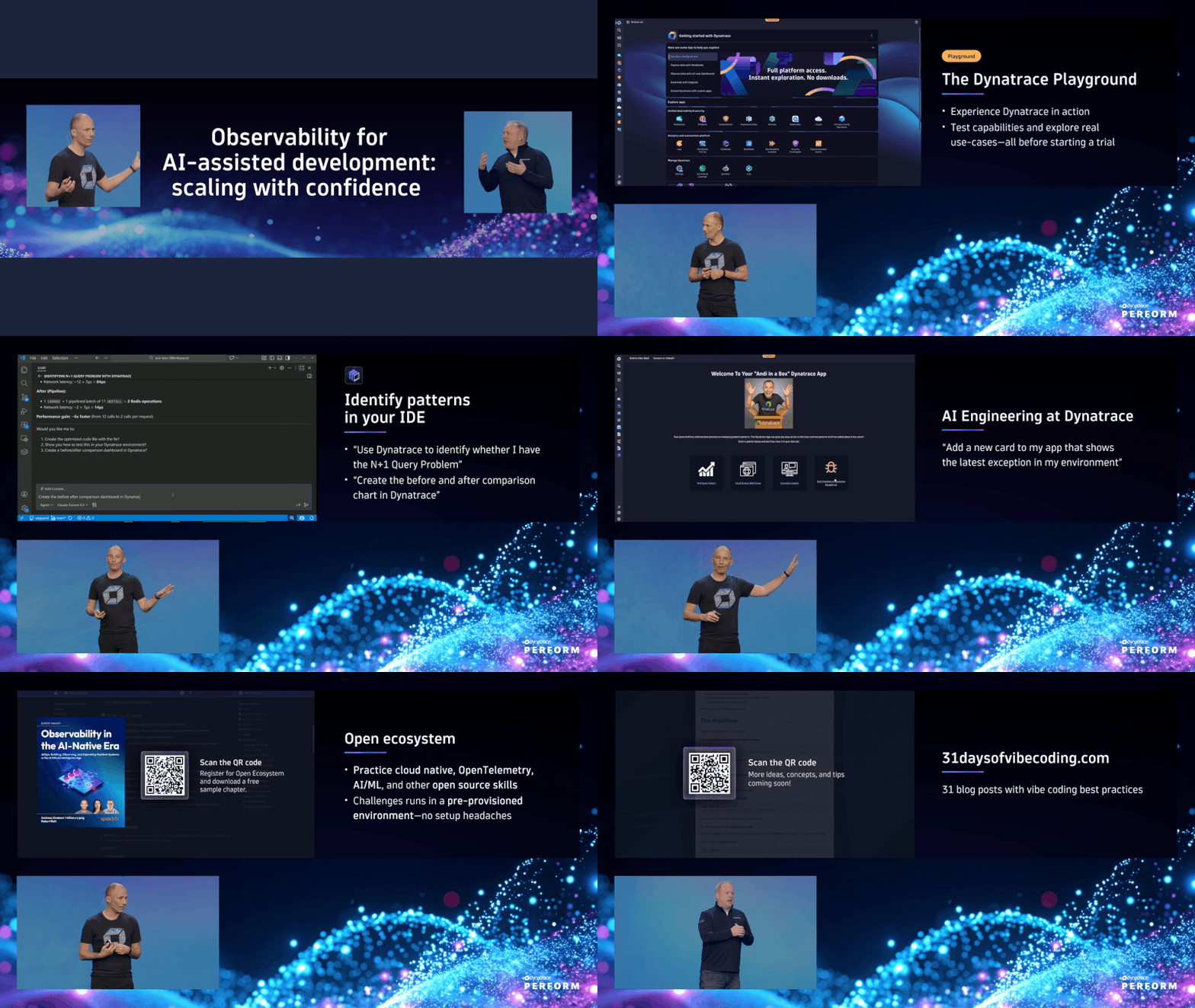
<p>It’s been a busy week. I just got home from Dynatrace’s Perform conference in Las Vegas, and it was definitely a week I will never forget. Had the opportunity to talk about my journey in vibe coding, and how important observability has become as a result. <a href="https://www.dynatrace.com/perform/on-demand/perform-2026/?_location=Mainstage&amp;topics=ALL&amp;industries=ALL&amp;jobTitles=ALL&amp;level=ALL&amp;track=ALL&amp;session=building-software-in-the-age-of-ai-with-autodesk#sessions">(You can watch it here)</a>.</p>

<p><a href="https://www.dynatrace.com/perform/on-demand/perform-2026/?_location=Mainstage&amp;topics=ALL&amp;industries=ALL&amp;jobTitles=ALL&amp;level=ALL&amp;track=ALL&amp;session=building-software-in-the-age-of-ai-with-autodesk#sessions"><img src="/images/perform.gif" alt="Slideshow of Dynatrace Perform presentation" /></a></p>

<p>In addition to that, I’ve also created a new app. While this one is invitation only, I updated the README.md on GitHub to showcase its functionality.</p>

<ul>
  <li><a href="https://BroMadness.com">BroMadness.com</a> – an app to run all of the contests for a friends trip to watch March Madness. (<a href="https://github.com/jeffblankenburg/bromadness.com">GitHub</a>)</li>
</ul>

<p>This was my first introduction into a few new technologies, including <a href="https://vercel.com">Vercel</a> &amp; <a href="https://supabase.com">Supabase</a>.  It was also my first time using <a href="https://www.twilio.com/docs/verify">Twilio Verify</a> to provide SMS verification as a login mechanism. I’ve heard many developers state that using AI to write software makes you a worse developer, but I’m finding that I’m learning more, faster than I ever did before.  I’d still be fighting with the Twilio integration and APIs, and instead, my app is already in production!</p>

<p>I also built another app that is for the Super Bowl game this Sunday.  My sister and brother-in-law’s last name is Stuber, and they host the “Stuber Bowl” watch party every year.  They have dozens of people participate in “prop bets” like “How long will the National Anthem take (in seconds)?” or “Will the first play from scrimmage ba a run or pass play?”  It’s always been managed in a spreadsheet, but in just a few hours on Monday night, I was able to build them an app that has:</p>

<ul>
  <li>Pick making directly in the app</li>
  <li>Live Chat with notification</li>
  <li>SMS verification for login</li>
  <li>Administrative tools to managing users and payment tracking, as well as the ability to enter results as they happen.</li>
  <li>Full leaderboard</li>
  <li>Profile management</li>
</ul>

<p>I can’t even express how fun software development has become for me again.  Until next week!</p>

<h2 id="some-light-reading">Some Light Reading</h2>
<ul>
  <li><a href="https://www.jernesto.com/articles/thinking_hard">I Miss Thinking Hard</a> - jernesto.com</li>
  <li><a href="https://brandon.wang/2026/clawdbot">A sane but extremely bull case on Clawdbot / OpenClaw</a> - brandon.wang</li>
  <li><a href="https://www.jasonwillems.com/technology/2026/02/02/AI-Copyright/">AI Didn’t Break Copyright Law, It Just Exposed How Broken It Already Was</a> - jasonwillems.com</li>
  <li><a href="https://www.a16z.news/p/most-people-cant-vibe-code-heres">Most People Can’t Vibe Code. Here’s How We Fix That.</a> - a16z.news</li>
  <li><a href="https://medium.com/data-science-collective/the-ai-vibe-coding-paradox-why-experience-matters-more-than-ever-33c343bfc2e1">The AI Vibe Coding Paradox: Why Experience Matters More Than Ever</a> - medium.com</li>
</ul>]]></content><author><name>Jeff Blankenburg</name></author><category term="blog" /><summary type="html"><![CDATA[Fresh content every Friday. The 31 Days series continues here.]]></summary></entry><entry><title type="html">Day 31: Your Personal Vibe Coding Playbook</title><link href="https://31daysofvibecoding.com/2026/01/31/personal-playbook/" rel="alternate" type="text/html" title="Day 31: Your Personal Vibe Coding Playbook" /><published>2026-01-31T00:00:00-05:00</published><updated>2026-01-31T00:00:00-05:00</updated><id>https://31daysofvibecoding.com/2026/01/31/personal-playbook</id><content type="html" xml:base="https://31daysofvibecoding.com/2026/01/31/personal-playbook/"><![CDATA[<p>You made it.</p>

<p>Thirty-one days of tactics, prompts, and practices. That’s a lot. Too much to use all at once. Too much to remember without a system.</p>

<p>Today we build your personal playbook. Not everything from this series. Just what works for you. A reference you’ll actually use. A foundation you’ll build on.</p>

<h2 id="what-goes-in-your-playbook">What Goes in Your Playbook</h2>

<p>Your playbook is personal. Mine has:</p>

<ul>
  <li><strong>CLAUDE.md</strong> - My agent configuration</li>
  <li><strong>common-ai-mistakes.md</strong> - Patterns AI gets wrong in my projects</li>
  <li><strong>prompts/</strong> - Templates for common tasks</li>
  <li><strong>checklists/</strong> - Pre-commit, pre-deploy, review checklists</li>
  <li><strong>runbooks/</strong> - What to do when things break</li>
</ul>

<p>Yours might be different. That’s the point. Take what works, leave what doesn’t.</p>

<h2 id="building-your-claudemd">Building Your CLAUDE.md</h2>

<p>Your agent configuration is the foundation. Here’s a template:</p>

<div class="language-markdown highlighter-rouge"><div class="highlight"><pre class="highlight"><code><span class="gh"># Project Configuration</span>

<span class="gu">## Tech Stack</span>
<span class="p">-</span> Language: [TypeScript/Python/etc.]
<span class="p">-</span> Framework: [React/Express/Django/etc.]
<span class="p">-</span> Database: [PostgreSQL/MongoDB/etc.]
<span class="p">-</span> Testing: [Jest/Pytest/etc.]

<span class="gu">## Code Standards</span>
<span class="p">-</span> [Your linting rules]
<span class="p">-</span> [Your formatting preferences]
<span class="p">-</span> [Your naming conventions]

<span class="gu">## Patterns to Follow</span>
<span class="p">-</span> Error handling: [describe your pattern]
<span class="p">-</span> Logging: [describe your telemetry approach]
<span class="p">-</span> Testing: [describe your test structure]

<span class="gu">## Patterns to Avoid</span>
<span class="p">-</span> [Don't use X, use Y instead]
<span class="p">-</span> [Never do Z because...]

<span class="gu">## Important Files</span>
<span class="p">-</span> [Key files AI should know about]

<span class="gu">## Common Tasks</span>
<span class="p">-</span> To run tests: [command]
<span class="p">-</span> To build: [command]
<span class="p">-</span> To deploy: [command]
</code></pre></div></div>

<p>Customize this for your project. Update it as you learn what AI needs to know.</p>

<h2 id="your-prompt-library">Your Prompt Library</h2>

<p>Start with these categories:</p>

<h3 id="generation-prompts">Generation Prompts</h3>
<ul>
  <li>Feature implementation</li>
  <li>API endpoint</li>
  <li>Component</li>
  <li>Test suite</li>
</ul>

<h3 id="review-prompts">Review Prompts</h3>
<ul>
  <li>Security review</li>
  <li>Performance review</li>
  <li>Maintainability review</li>
</ul>

<h3 id="debug-prompts">Debug Prompts</h3>
<ul>
  <li>Production issue</li>
  <li>Log analysis</li>
  <li>Stack trace analysis</li>
</ul>

<h3 id="maintenance-prompts">Maintenance Prompts</h3>
<ul>
  <li>Refactoring</li>
  <li>Documentation</li>
  <li>Debt inventory</li>
</ul>

<p>You don’t need dozens. Start with one prompt per category. Add more as you discover what you use repeatedly.</p>

<h2 id="your-mistakes-file">Your Mistakes File</h2>

<p>Create <code class="language-plaintext highlighter-rouge">common-ai-mistakes.md</code> and add to it:</p>

<div class="language-markdown highlighter-rouge"><div class="highlight"><pre class="highlight"><code><span class="gh"># Common AI Mistakes</span>

<span class="gu">## [Category]</span>

<span class="gu">### [Mistake Name]</span>
AI tends to: [what AI does wrong]
Instead: [what you want]
Why: [brief explanation]
</code></pre></div></div>

<p>Start empty. Every time you correct AI twice for the same thing, add it.</p>

<h2 id="your-checklists">Your Checklists</h2>

<h3 id="pre-commit-checklist">Pre-Commit Checklist</h3>
<div class="language-plaintext highlighter-rouge"><div class="highlight"><pre class="highlight"><code>□ Tests pass
□ No linting errors
□ No console.logs or debug code
□ Sensitive data not exposed
□ Types are accurate
□ Error handling is complete
</code></pre></div></div>

<h3 id="pre-deploy-checklist">Pre-Deploy Checklist</h3>
<div class="language-plaintext highlighter-rouge"><div class="highlight"><pre class="highlight"><code>□ All tests pass in CI
□ Migrations tested
□ Rollback plan documented
□ Monitoring in place
□ Stakeholders notified
□ On-call aware
</code></pre></div></div>

<h3 id="code-review-checklist">Code Review Checklist</h3>
<div class="language-plaintext highlighter-rouge"><div class="highlight"><pre class="highlight"><code>□ Security pass completed
□ Performance considered
□ Edge cases handled
□ Tests are meaningful
□ Patterns are consistent
</code></pre></div></div>

<h2 id="your-workflow">Your Workflow</h2>

<p>Document your AI workflow:</p>

<h3 id="feature-development">Feature Development</h3>
<ol>
  <li>Write GitHub issue with full context</li>
  <li>Review architecture with AI</li>
  <li>Define contracts/interfaces</li>
  <li>Generate implementation</li>
  <li>Generate tests</li>
  <li>Run multi-pass review</li>
  <li>Refactor as needed</li>
  <li>Deploy with checklist</li>
</ol>

<h3 id="bug-fixing">Bug Fixing</h3>
<ol>
  <li>Gather symptoms and logs</li>
  <li>Hypothesis with AI</li>
  <li>Add logging if needed</li>
  <li>Test hypothesis</li>
  <li>Fix and test</li>
  <li>Add regression test</li>
</ol>

<h3 id="debugging">Debugging</h3>
<ol>
  <li>Describe symptom to AI</li>
  <li>Get list of likely causes</li>
  <li>Check each systematically</li>
  <li>Confirm root cause</li>
  <li>Generate fix</li>
  <li>Verify fix</li>
</ol>

<h2 id="principles-to-remember">Principles to Remember</h2>

<p>From this series, the principles that matter most:</p>

<p><strong>1. You’re the architect</strong>
AI is your junior developer. You make the decisions. AI helps you implement them faster.</p>

<p><strong>2. Observability is non-negotiable</strong>
When shipping fast, you need to know when things break. Logs, metrics, traces. Always.</p>

<p><strong>3. Context is everything</strong>
Better prompts get better results. Include what AI needs to know. Structure your prompts.</p>

<p><strong>4. Trust but verify</strong>
AI makes mistakes. Review output. Run tests. Check edge cases. Don’t assume it’s right.</p>

<p><strong>5. Small steps, frequent verification</strong>
Break big features into phases. Verify each phase works before continuing.</p>

<p><strong>6. Document what you learn</strong>
Add to your mistakes file. Update your prompts. Evolve your configuration. Learning compounds.</p>

<h2 id="the-30-day-summary">The 30-Day Summary</h2>

<p>What we covered:</p>

<p><strong>Week 1: Foundation</strong></p>
<ul>
  <li>What vibe coding is (and isn’t)</li>
  <li>Using GitHub issues as context</li>
  <li>Component libraries for consistency</li>
  <li>Observability from the start</li>
  <li>The prompting pattern</li>
  <li>Breaking features into phases</li>
  <li>Context management</li>
</ul>

<p><strong>Week 2: Tactics</strong></p>
<ul>
  <li>When to restart vs. continue</li>
  <li>Git as your undo button</li>
  <li>Agent configuration</li>
  <li>Teaching AI your patterns</li>
  <li>The mistakes file</li>
  <li>Constraining AI changes</li>
  <li>Spotting hallucinations</li>
</ul>

<p><strong>Week 3: Expert Roles</strong></p>
<ul>
  <li>Context and tokens</li>
  <li>Security auditing</li>
  <li>Performance auditing</li>
  <li>Test generation</li>
  <li>Multi-pass code review</li>
  <li>Debugging with AI</li>
  <li>Architecture evaluation</li>
</ul>

<p><strong>Week 4: Production &amp; Mastery</strong></p>
<ul>
  <li>Production debugging</li>
  <li>Edge case generation</li>
  <li>Deployment automation</li>
  <li>Refactoring AI code</li>
  <li>Multi-service coordination</li>
  <li>Prompt libraries</li>
  <li>Tool landscape</li>
  <li>Measuring effectiveness</li>
  <li>Managing technical debt</li>
  <li>This playbook</li>
</ul>

<h2 id="whats-next">What’s Next</h2>

<p>The series is over. Your journey continues.</p>

<p><strong>Keep learning:</strong> AI tools evolve rapidly. What doesn’t work today might work next month. Stay curious.</p>

<p><strong>Keep measuring:</strong> Track whether AI helps. Adjust based on evidence.</p>

<p><strong>Keep sharing:</strong> When you find something that works, share it. The community benefits from collective learning.</p>

<p><strong>Keep shipping:</strong> The point isn’t to use AI. The point is to build things that matter. AI is just a tool. Use it when it helps. Skip it when it doesn’t.</p>

<h2 id="the-final-challenge">The Final Challenge</h2>

<p>Build something.</p>

<p>Not a todo app. Not a tutorial project. Something real. Something you’ll use. Something you’ll show people.</p>

<p>Use what you’ve learned:</p>
<ul>
  <li>Plan with AI</li>
  <li>Generate with AI</li>
  <li>Review with AI</li>
  <li>Test with AI</li>
  <li>Deploy with your checklists</li>
  <li>Monitor with observability</li>
</ul>

<p>Ship it. Then tell me about it.</p>

<h2 id="thank-you">Thank You</h2>

<p>If you’ve followed along for all 31 days, thank you. I hope you ship faster and with more confidence.</p>

<p>Vibe coding isn’t about AI doing your work. It’s about you doing better work with AI’s help. Stay in flow. Trust your judgment. Keep the AI as your assistant, not your replacement.</p>

<p>Now go build something.</p>

<hr />

<h2 id="your-playbook-checklist">Your Playbook Checklist</h2>

<p>Before you close this series:</p>

<div class="language-plaintext highlighter-rouge"><div class="highlight"><pre class="highlight"><code>□ CLAUDE.md created and customized
□ common-ai-mistakes.md started (even if empty)
□ At least one prompt template saved
□ Pre-commit checklist documented
□ Workflow documented
□ First project identified to build
</code></pre></div></div>

<p>You don’t need everything. You need something. Start there. Add more as you go.</p>

<p>The best playbook is the one you’ll actually use.</p>]]></content><author><name>Jeff Blankenburg</name></author><category term="series" /><summary type="html"><![CDATA[You've learned 30 days of tactics. Now make it yours. Build your personal playbook for AI-assisted development.]]></summary></entry><entry><title type="html">Day 30: Managing Technical Debt When Shipping Fast</title><link href="https://31daysofvibecoding.com/2026/01/30/technical-debt/" rel="alternate" type="text/html" title="Day 30: Managing Technical Debt When Shipping Fast" /><published>2026-01-30T00:00:00-05:00</published><updated>2026-01-30T00:00:00-05:00</updated><id>https://31daysofvibecoding.com/2026/01/30/technical-debt</id><content type="html" xml:base="https://31daysofvibecoding.com/2026/01/30/technical-debt/"><![CDATA[<p>The code worked. The code was a mess.</p>

<p>AI had generated features at unprecedented speed. Two months in, I had a product. I also had a codebase that scared me. Inconsistent patterns. Functions doing too much. Tests that passed but didn’t actually test anything. Comments that lied about what the code did.</p>

<p>I’d traded velocity for debt. Now the debt was coming due.</p>

<p>This is the dark side of vibe coding. Speed is addictive. Debt accumulates silently. Then one day you try to add a simple feature and it takes three days because everything is tangled.</p>

<p>Managing debt isn’t about not having debt. It’s about having the right amount of debt and paying it down strategically.</p>

<h2 id="why-ai-code-accumulates-debt-faster">Why AI Code Accumulates Debt Faster</h2>

<p>AI code has specific debt patterns:</p>

<p><strong>Inconsistency:</strong> Each generation might use slightly different patterns. Small inconsistencies compound into chaos.</p>

<p><strong>Over-engineering:</strong> AI often generates more than you need. That extra code is debt you maintain forever.</p>

<p><strong>Shallow testing:</strong> AI writes tests that pass, but don’t actually verify behavior. You think you have coverage. You don’t.</p>

<p><strong>Missing context:</strong> AI doesn’t know why past decisions were made. It might undo intentional choices.</p>

<p><strong>Copy-paste sprawl:</strong> It’s easy to generate similar code instead of abstracting. Duplication is debt.</p>

<h2 id="the-debt-inventory-prompt">The Debt Inventory Prompt</h2>

<p>Start by knowing what you have:</p>

<div class="language-plaintext highlighter-rouge"><div class="highlight"><pre class="highlight"><code>Analyze this codebase for technical debt.

Categories:
1. Code duplication - similar code that should be abstracted
2. Inconsistent patterns - same thing done different ways
3. Missing tests - code without adequate coverage
4. Missing docs - complex code without explanation
5. Dead code - code that's never executed
6. Outdated dependencies - libraries that need updates
7. Performance debt - known slow paths not optimized
8. Security debt - known vulnerabilities not addressed

For each item:
- Location
- Severity (blocking / painful / annoying)
- Effort to fix (hours)
- Risk if not fixed
</code></pre></div></div>

<h2 id="prioritizing-debt">Prioritizing Debt</h2>

<p>Not all debt is equal. Prioritize by:</p>

<p><strong>Impact on velocity:</strong> Does this debt slow down every feature? Fix it.</p>

<p><strong>Risk:</strong> Could this debt cause production issues? Fix it soon.</p>

<p><strong>Compounding:</strong> Will this debt get worse over time? Address before it spreads.</p>

<p><strong>Effort:</strong> How hard is it to fix? Sometimes quick wins are worth doing.</p>

<div class="language-plaintext highlighter-rouge"><div class="highlight"><pre class="highlight"><code>Priority = (Impact × Risk × Compounding) / Effort
</code></pre></div></div>

<p>High impact, high risk, compounding, low effort = fix immediately.
Low impact, low risk, isolated, high effort = maybe never.</p>

<h2 id="the-20-rule">The 20% Rule</h2>

<p>Reserve 20% of your time for debt reduction.</p>

<p>Every week, every sprint, every cycle: 20% goes to making the codebase better.</p>

<ul>
  <li>4 days on features, 1 day on debt</li>
  <li>4 features, 1 cleanup task</li>
  <li>Every PR improves one thing beyond its scope</li>
</ul>

<p>This isn’t optional. It’s investment. Skip it, and velocity drops over time.</p>

<h2 id="ai-assisted-debt-paydown">AI-Assisted Debt Paydown</h2>

<p>Use AI to fix what AI created:</p>

<h3 id="pattern-consolidation">Pattern Consolidation</h3>

<div class="language-plaintext highlighter-rouge"><div class="highlight"><pre class="highlight"><code>I have the same pattern implemented multiple ways.

Example 1: [paste code]
Example 2: [paste code]
Example 3: [paste code]

Create a single abstraction that handles all these cases.
Then show me how to refactor each usage.
</code></pre></div></div>

<h3 id="test-improvement">Test Improvement</h3>

<div class="language-plaintext highlighter-rouge"><div class="highlight"><pre class="highlight"><code>These tests pass but I don't trust them.

Tests: [paste tests]
Code they test: [paste code]

Identify:
1. What behaviors aren't actually tested?
2. What edge cases are missed?
3. What assertions are too weak?

Generate improved tests that would catch real bugs.
</code></pre></div></div>

<h3 id="documentation-generation">Documentation Generation</h3>

<div class="language-plaintext highlighter-rouge"><div class="highlight"><pre class="highlight"><code>This code is complex and undocumented.

Code: [paste code]

Generate:
1. High-level explanation of what this does
2. Inline comments for non-obvious parts
3. Examples of how to use it
4. Known limitations or gotchas
</code></pre></div></div>

<h2 id="the-debt-log">The Debt Log</h2>

<p>Track debt explicitly:</p>

<div class="language-markdown highlighter-rouge"><div class="highlight"><pre class="highlight"><code><span class="gh"># Technical Debt Log</span>

<span class="gu">## Critical (fix this sprint)</span>
<span class="p">-</span> [ ] User auth has no rate limiting (security risk)
<span class="p">-</span> [ ] Card search uses N+1 queries (performance)

<span class="gu">## High (fix this month)</span>
<span class="p">-</span> [ ] Three different error handling patterns
<span class="p">-</span> [ ] Tests mock at wrong level, don't catch bugs

<span class="gu">## Medium (fix this quarter)</span>
<span class="p">-</span> [ ] Duplicate validation logic in 5 places
<span class="p">-</span> [ ] Old migration files never cleaned up

<span class="gu">## Low (fix when convenient)</span>
<span class="p">-</span> [ ] Inconsistent naming in legacy module
<span class="p">-</span> [ ] Console.logs left in non-critical paths

<span class="gu">## Accepted (won't fix)</span>
<span class="p">-</span> [ ] Old admin panel uses deprecated patterns (replacing soon)
</code></pre></div></div>

<p>Review this log weekly. Move items up as they become urgent.</p>

<h2 id="prevention-strategies">Prevention Strategies</h2>

<p>Better to not create debt than to pay it down:</p>

<h3 id="pre-generation-review">Pre-Generation Review</h3>

<p>Before asking AI to generate significant code:</p>

<div class="language-plaintext highlighter-rouge"><div class="highlight"><pre class="highlight"><code>I'm about to generate code for [feature].

Before I do, tell me:
1. What existing patterns should this follow?
2. What abstractions already exist that I should use?
3. What could I generate that would create debt?
4. What should I specify to prevent mess?
</code></pre></div></div>

<h3 id="post-generation-cleanup">Post-Generation Cleanup</h3>

<p>After AI generates code, before committing:</p>

<div class="language-plaintext highlighter-rouge"><div class="highlight"><pre class="highlight"><code>Review this AI-generated code for debt indicators:

[paste code]

Check for:
- Duplicates what exists elsewhere?
- Inconsistent with established patterns?
- Over-engineered for the need?
- Missing tests for important paths?
- Hardcoded values that should be config?

What should be cleaned up before committing?
</code></pre></div></div>

<h3 id="the-pr-checklist">The PR Checklist</h3>

<p>Before every merge:</p>

<div class="language-plaintext highlighter-rouge"><div class="highlight"><pre class="highlight"><code>□ Follows existing patterns (or intentionally changes them)
□ No new duplication
□ Tests cover actual behavior
□ No unnecessary complexity
□ No new warnings or linting issues
□ Documentation updated if needed
□ One thing improved beyond the feature
</code></pre></div></div>

<h2 id="debt-sprints">Debt Sprints</h2>

<p>Sometimes you need focused cleanup:</p>

<p>Every quarter, schedule a debt sprint. One week focused entirely on debt reduction.</p>

<ul>
  <li>No new features</li>
  <li>Only cleanup, consolidation, testing, documentation</li>
  <li>Measure: lines deleted, patterns consolidated, test coverage increased</li>
</ul>

<p>One week of cleanup buys months of velocity.</p>

<h2 id="the-strangler-pattern-for-legacy-ai-code">The Strangler Pattern for Legacy AI Code</h2>

<p>When you have AI-generated code that needs major improvement:</p>

<ol>
  <li>Don’t rewrite all at once</li>
  <li>Build new code correctly alongside old</li>
  <li>Route new features to new code</li>
  <li>Gradually migrate old features</li>
  <li>Delete old code when nothing uses it</li>
</ol>

<p>AI can help:</p>

<div class="language-plaintext highlighter-rouge"><div class="highlight"><pre class="highlight"><code>I have legacy code that needs replacement.

Old code: [paste]
What it does: [describe]

Generate a new, cleaner implementation.
Show me how to run both in parallel during migration.
</code></pre></div></div>

<h2 id="signs-you-have-too-much-debt">Signs You Have Too Much Debt</h2>

<ul>
  <li>Features take longer and longer</li>
  <li>Every change breaks something unrelated</li>
  <li>New developers can’t understand the code</li>
  <li>You avoid touching certain areas</li>
  <li>Tests pass but production breaks</li>
  <li>Simple bugs take hours to fix</li>
</ul>

<p>When you see these signs, stop features and pay down debt.</p>

<h2 id="tomorrow">Tomorrow</h2>

<p>Final day. You’ve learned tactics for AI-assisted development. Tomorrow we’ll build your personal playbook: the practices you’ll keep, the workflow you’ll use, the principles that guide your vibe coding.</p>

<hr />

<h2 id="try-this-today">Try This Today</h2>

<ol>
  <li>Pick one area of your codebase that scares you</li>
  <li>Run the debt inventory prompt on it</li>
  <li>Fix one thing. Just one.</li>
</ol>

<p>Small, consistent debt payment beats occasional massive rewrites. Start today. Continue tomorrow. In a month, the scary area is manageable.</p>

<p>Debt is normal. Unmanaged debt is the problem.</p>]]></content><author><name>Jeff Blankenburg</name></author><category term="series" /><summary type="html"><![CDATA[AI helps you ship fast. Fast creates debt. Learn to manage debt without drowning in it.]]></summary></entry><entry><title type="html">Day 29: Measuring What Matters: Is AI Actually Helping?</title><link href="https://31daysofvibecoding.com/2026/01/29/measuring-what-matters/" rel="alternate" type="text/html" title="Day 29: Measuring What Matters: Is AI Actually Helping?" /><published>2026-01-29T00:00:00-05:00</published><updated>2026-01-29T00:00:00-05:00</updated><id>https://31daysofvibecoding.com/2026/01/29/measuring-what-matters</id><content type="html" xml:base="https://31daysofvibecoding.com/2026/01/29/measuring-what-matters/"><![CDATA[<p>I felt faster.</p>

<p>Prompts flying. Code generating. Features shipping. The vibe was strong.</p>

<p>Then I looked at my actual output. Features shipped per week. Bugs in production. Time from issue to deployment. The numbers told a different story than my feelings.</p>

<p>I wasn’t faster. I was busier. More code was being written. But the important metrics were about the same.</p>

<p>That’s when I learned: feeling productive and being productive are different things. If you want to know whether AI is actually helping, you need to measure.</p>

<h2 id="what-not-to-measure">What Not to Measure</h2>

<p>Some metrics are useless or misleading:</p>

<p><strong>Lines of code:</strong> More code isn’t better. AI generates verbose code. You might ship more lines and less value.</p>

<p><strong>Prompts per day:</strong> Using AI more doesn’t mean accomplishing more. You could be prompting in circles.</p>

<p><strong>Features started:</strong> Starting is easy. Finishing is what matters.</p>

<p><strong>Time in AI tools:</strong> Time spent doesn’t equal value produced.</p>

<p>These metrics make you feel productive without telling you if you’re productive.</p>

<h2 id="what-to-measure">What to Measure</h2>

<p>Focus on outcomes, not activities:</p>

<h3 id="cycle-time">Cycle Time</h3>

<p>Time from starting a task to deploying it.</p>

<div class="language-plaintext highlighter-rouge"><div class="highlight"><pre class="highlight"><code>Cycle time = Deploy timestamp - Start timestamp
</code></pre></div></div>

<p>If AI is helping, cycle time should decrease. Track this per feature or per issue.</p>

<h3 id="throughput">Throughput</h3>

<p>Features or issues completed per week.</p>

<div class="language-plaintext highlighter-rouge"><div class="highlight"><pre class="highlight"><code>Throughput = Completed items / Time period
</code></pre></div></div>

<p>If AI is helping, throughput should increase while quality stays constant.</p>

<h3 id="quality-metrics">Quality Metrics</h3>

<p>Bugs in AI-generated code vs. manually written code.</p>

<p>Track:</p>
<ul>
  <li>Bugs reported per feature</li>
  <li>Time to find bugs (in testing vs. production)</li>
  <li>Severity of bugs</li>
  <li>Rework needed after initial implementation</li>
</ul>

<p>If AI code has more bugs, you’re not actually saving time.</p>

<h3 id="time-distribution">Time Distribution</h3>

<p>Where does your time go?</p>

<p>Categories:</p>
<ul>
  <li>Planning and design</li>
  <li>Writing prompts</li>
  <li>Reviewing AI output</li>
  <li>Fixing AI mistakes</li>
  <li>Manual implementation</li>
  <li>Testing</li>
  <li>Debugging</li>
  <li>Deployment</li>
</ul>

<p>If you spend 2 hours prompting and reviewing to save 1 hour of coding, that’s a net loss.</p>

<h2 id="setting-up-tracking">Setting Up Tracking</h2>

<p>You don’t need complex tooling. Start simple:</p>

<h3 id="option-1-github-labels">Option 1: GitHub Labels</h3>

<p>Label issues with how they were built:</p>
<ul>
  <li><code class="language-plaintext highlighter-rouge">ai-assisted</code></li>
  <li><code class="language-plaintext highlighter-rouge">manual</code></li>
  <li><code class="language-plaintext highlighter-rouge">ai-heavy</code></li>
</ul>

<p>Compare metrics between labels.</p>

<h3 id="option-2-time-tracking">Option 2: Time Tracking</h3>

<p>Track time per task with notes on AI usage. At the end of each week, review:</p>
<ul>
  <li>What took longest?</li>
  <li>Where did AI help?</li>
  <li>Where did AI hurt?</li>
</ul>

<h3 id="option-3-simple-spreadsheet">Option 3: Simple Spreadsheet</h3>

<div class="language-plaintext highlighter-rouge"><div class="highlight"><pre class="highlight"><code>| Feature | Start | Deploy | AI? | Bugs | Rework? |
|---------|-------|--------|-----|------|---------|
| Wishlist | 1/15 | 1/17  | Yes | 1    | No      |
| Search   | 1/18 | 1/25  | Yes | 3    | Yes     |
| Profile  | 1/26 | 1/27  | No  | 0    | No      |
</code></pre></div></div>

<p>Patterns emerge quickly.</p>

<h2 id="honest-assessment-questions">Honest Assessment Questions</h2>

<p>Ask yourself weekly:</p>

<ol>
  <li>
    <p><strong>What did I ship this week?</strong> Not start. Ship.</p>
  </li>
  <li>
    <p><strong>What took longer than expected?</strong> Was AI a factor?</p>
  </li>
  <li>
    <p><strong>What bugs did I introduce?</strong> How many were in AI code?</p>
  </li>
  <li>
    <p><strong>What did I waste time on?</strong> Prompting in circles? Fixing AI mistakes?</p>
  </li>
  <li>
    <p><strong>What would I do differently?</strong> With hindsight, would AI have been the right choice?</p>
  </li>
</ol>

<h2 id="the-ai-overhead-trap">The AI Overhead Trap</h2>

<p>AI has overhead:</p>
<ul>
  <li>Writing prompts takes time</li>
  <li>Reviewing output takes time</li>
  <li>Fixing mistakes takes time</li>
  <li>Context switching takes time</li>
</ul>

<p>For simple tasks, this overhead can exceed the benefit.</p>

<div class="language-plaintext highlighter-rouge"><div class="highlight"><pre class="highlight"><code>AI benefit = Time saved - (Prompt time + Review time + Fix time)
</code></pre></div></div>

<p>If the benefit is negative, AI slowed you down.</p>

<h2 id="where-ai-actually-helps">Where AI Actually Helps</h2>

<p>In my tracking, AI helps most with:</p>

<p><strong>Boilerplate generation:</strong> Tests, CRUD endpoints, similar components. High repetition, low complexity.</p>

<p><strong>Code review:</strong> Finding issues I’d miss. Consistent multi-pass review.</p>

<p><strong>Exploration:</strong> “How would I approach this?” Planning before coding.</p>

<p><strong>Edge cases:</strong> Thinking of scenarios I wouldn’t consider.</p>

<p><strong>Documentation:</strong> Explaining code, writing docs, creating runbooks.</p>

<h2 id="where-ai-hurts">Where AI Hurts</h2>

<p>AI hurts most with:</p>

<p><strong>Novel problems:</strong> Unique architecture, unusual requirements. AI has no patterns to draw from.</p>

<p><strong>Subtle bugs:</strong> AI confidently generates code with subtle issues. Review time exceeds benefit.</p>

<p><strong>Over-engineering:</strong> AI adds complexity when simplicity would work. Then I maintain the complexity.</p>

<p><strong>Context-heavy work:</strong> When you need to understand 20 files to make a small change. AI’s understanding is shallow.</p>

<h2 id="the-comparison-test">The Comparison Test</h2>

<p>Try this experiment:</p>

<ol>
  <li>Pick two similar features</li>
  <li>Build one with heavy AI assistance</li>
  <li>Build one with minimal AI</li>
  <li>Compare: time, quality, bugs, rework</li>
</ol>

<p>What you find might surprise you. Sometimes the manual approach is faster for your context.</p>

<h2 id="tracking-template">Tracking Template</h2>

<p>Weekly review template:</p>

<div class="language-markdown highlighter-rouge"><div class="highlight"><pre class="highlight"><code><span class="gh"># Week of [date]</span>

<span class="gu">## Shipped</span>
<span class="p">-</span> [feature 1] - AI heavy/light/none - [time] - [bugs]
<span class="p">-</span> [feature 2] - ...

<span class="gu">## Time Distribution</span>
<span class="p">-</span> Planning: X hours
<span class="p">-</span> Prompting: X hours
<span class="p">-</span> Reviewing AI: X hours
<span class="p">-</span> Fixing AI: X hours
<span class="p">-</span> Manual coding: X hours
<span class="p">-</span> Testing: X hours
<span class="p">-</span> Other: X hours

<span class="gu">## What Worked</span>
<span class="p">-</span> [what AI helped with]

<span class="gu">## What Didn't Work</span>
<span class="p">-</span> [where AI hurt]

<span class="gu">## Next Week</span>
<span class="p">-</span> [what to do differently]
</code></pre></div></div>

<h2 id="the-honest-truth">The Honest Truth</h2>

<p>AI doesn’t make everyone faster on everything.</p>

<p>It makes some people faster on some things. The only way to know if it’s helping you is to measure.</p>

<p>Track your outcomes. Be honest about what you find. Adjust your usage based on evidence, not vibes.</p>

<h2 id="tomorrow">Tomorrow</h2>

<p>Fast is good. Sustainable is better. Tomorrow I’ll cover managing technical debt when you’re shipping fast with AI. How to stay fast without drowning in accumulated mess.</p>

<hr />

<h2 id="try-this-today">Try This Today</h2>

<ol>
  <li>Pick a feature you built with AI recently</li>
  <li>Estimate the time breakdown: prompting, reviewing, fixing, manual work</li>
  <li>Would it have been faster without AI?</li>
</ol>

<p>Be honest. The answer might be yes. That’s useful information. It tells you where to use AI and where not to.</p>

<p>The goal isn’t to use AI. The goal is to ship good software. AI is one tool. Measure whether it’s actually helping.</p>]]></content><author><name>Jeff Blankenburg</name></author><category term="series" /><summary type="html"><![CDATA[You're using AI. You feel faster. But are you? Learn what to measure to know if AI is actually improving your output.]]></summary></entry><entry><title type="html">Day 28: The AI Tool Landscape: When to Use What</title><link href="https://31daysofvibecoding.com/2026/01/28/ai-tool-landscape/" rel="alternate" type="text/html" title="Day 28: The AI Tool Landscape: When to Use What" /><published>2026-01-28T00:00:00-05:00</published><updated>2026-01-28T00:00:00-05:00</updated><id>https://31daysofvibecoding.com/2026/01/28/ai-tool-landscape</id><content type="html" xml:base="https://31daysofvibecoding.com/2026/01/28/ai-tool-landscape/"><![CDATA[<p>I use four different AI tools.</p>

<p>Not because I can’t pick one. Because different tools are better at different things. Claude Code for codebase-wide changes. GitHub Copilot for inline completions. ChatGPT for exploring ideas. Cursor when I want AI deeply integrated in my editor.</p>

<p>The tool landscape is confusing. Marketing makes everything sound the same. In practice, they’re different in ways that matter.</p>

<p>Here’s my honest assessment of when to use what.</p>

<h2 id="claude-code">Claude Code</h2>

<p><strong>Best for:</strong> Codebase-wide operations, multi-file changes, complex reasoning</p>

<p>Claude Code operates across your entire repository. It can read multiple files, understand relationships, and make coordinated changes. When you need to refactor a pattern that appears in 20 files, Claude Code handles it.</p>

<p><strong>Use it when:</strong></p>
<ul>
  <li>Changes span multiple files</li>
  <li>You need to understand how components relate</li>
  <li>Complex reasoning about architecture</li>
  <li>Large refactoring operations</li>
  <li>You want AI to read existing patterns and follow them</li>
</ul>

<p><strong>Skip it when:</strong></p>
<ul>
  <li>Quick inline completions</li>
  <li>You just need a one-liner</li>
  <li>Exploring ideas before you know what you want</li>
</ul>

<p><strong>Strengths:</strong> Deep codebase understanding, multi-file coordination, detailed reasoning, long context window</p>

<p><strong>Weaknesses:</strong> Setup required, can be slower for quick tasks, costs more for heavy use</p>

<h2 id="github-copilot">GitHub Copilot</h2>

<p><strong>Best for:</strong> Inline completions, quick suggestions while typing</p>

<p>Copilot lives in your editor. As you type, it suggests completions. It’s fast and low-friction. Write a function signature, Copilot suggests the body. Write a comment, Copilot suggests the code.</p>

<p><strong>Use it when:</strong></p>
<ul>
  <li>Writing code line by line</li>
  <li>Boilerplate that follows patterns</li>
  <li>Test cases similar to existing ones</li>
  <li>Obvious implementations</li>
  <li>You know what you want, just need it typed faster</li>
</ul>

<p><strong>Skip it when:</strong></p>
<ul>
  <li>Complex multi-file changes</li>
  <li>You need to understand before generating</li>
  <li>Architecture decisions</li>
  <li>Code review</li>
</ul>

<p><strong>Strengths:</strong> Speed, low friction, IDE integration, learns your patterns</p>

<p><strong>Weaknesses:</strong> No reasoning shown, limited to local context, sometimes suggests wrong patterns</p>

<h2 id="chatgpt--claude-web">ChatGPT / Claude Web</h2>

<p><strong>Best for:</strong> Exploration, planning, learning, one-off questions</p>

<p>The web interfaces are for thinking out loud. You don’t need file access. You want to explore an idea, understand a concept, plan an approach before committing.</p>

<p><strong>Use it when:</strong></p>
<ul>
  <li>“How should I approach this?”</li>
  <li>“Explain this concept”</li>
  <li>“What are the tradeoffs between X and Y?”</li>
  <li>Planning before implementing</li>
  <li>Quick questions unrelated to specific code</li>
</ul>

<p><strong>Skip it when:</strong></p>
<ul>
  <li>You need to work with actual files</li>
  <li>Multi-file changes</li>
  <li>Generating production code</li>
</ul>

<p><strong>Strengths:</strong> Easy access, no setup, good for conversation, multiple models available</p>

<p><strong>Weaknesses:</strong> Can’t see your code, copy-paste friction, context lost between sessions</p>

<h2 id="cursor">Cursor</h2>

<p><strong>Best for:</strong> AI-native editing, tight editor integration</p>

<p>Cursor is an IDE built around AI. It has Claude and GPT built in, with deep integration for editing, chat, and code generation. If you want AI to be central to your editing experience, Cursor makes it seamless.</p>

<p><strong>Use it when:</strong></p>
<ul>
  <li>You want AI always available in your editor</li>
  <li>Editing and generation in one flow</li>
  <li>You prefer IDE over CLI</li>
  <li>Your workflow is file-by-file with AI help</li>
</ul>

<p><strong>Skip it when:</strong></p>
<ul>
  <li>Large codebase-wide operations</li>
  <li>You’re happy with your current editor</li>
  <li>You want to keep AI separate from editing</li>
</ul>

<p><strong>Strengths:</strong> Seamless integration, fast iteration, good UX for AI-assisted editing</p>

<p><strong>Weaknesses:</strong> Another IDE to learn, subscription cost, less control than CLI</p>

<h2 id="windsurf--codeium">Windsurf / Codeium</h2>

<p><strong>Best for:</strong> Free alternative, team environments</p>

<p>Codeium and Windsurf offer AI coding tools with generous free tiers. Good for teams that can’t justify per-seat costs or developers who want to try AI coding without commitment.</p>

<p><strong>Use it when:</strong></p>
<ul>
  <li>Budget constraints</li>
  <li>Evaluating AI tools</li>
  <li>Team rollout with cost concerns</li>
</ul>

<p><strong>Strengths:</strong> Free tier, team features, good performance</p>

<p><strong>Weaknesses:</strong> Less cutting-edge than premium options, smaller context windows</p>

<h2 id="aider">Aider</h2>

<p><strong>Best for:</strong> Terminal-native workflows, Git integration</p>

<p>Aider is a command-line tool that integrates AI with Git. Every AI change becomes a commit. It’s great if you live in the terminal and want version control built into AI interactions.</p>

<p><strong>Use it when:</strong></p>
<ul>
  <li>You prefer terminal over IDE</li>
  <li>You want every AI change as a Git commit</li>
  <li>You’re working on specific files, not exploring</li>
</ul>

<p><strong>Skip it when:</strong></p>
<ul>
  <li>You want visual UI</li>
  <li>You’re exploring broad changes</li>
</ul>

<p><strong>Strengths:</strong> Git integration, terminal-native, supports multiple AI models</p>

<p><strong>Weaknesses:</strong> Learning curve, less visual feedback</p>

<h2 id="my-daily-workflow">My Daily Workflow</h2>

<p>Here’s how I actually use these tools:</p>

<p><strong>Morning planning:</strong> ChatGPT or Claude web for thinking through what I’m building. “Here’s what I want to accomplish. What’s the approach?”</p>

<p><strong>Implementation:</strong> Claude Code for features that touch multiple files. Copilot for inline completions while I type. Switch between them based on task size.</p>

<p><strong>Quick fixes:</strong> Copilot for obvious one-liners. Claude Code if I need to find where the fix should go.</p>

<p><strong>Code review:</strong> Claude Code for multi-pass reviews. It can read the whole codebase and spot inconsistencies.</p>

<p><strong>Debugging:</strong> Claude Code for systematic debugging with code access. ChatGPT for quick “why might this happen?” questions.</p>

<h2 id="choosing-based-on-task">Choosing Based on Task</h2>

<table>
  <thead>
    <tr>
      <th>Task</th>
      <th>Best Tool</th>
    </tr>
  </thead>
  <tbody>
    <tr>
      <td>Inline completions</td>
      <td>Copilot</td>
    </tr>
    <tr>
      <td>Multi-file refactor</td>
      <td>Claude Code</td>
    </tr>
    <tr>
      <td>Explain a concept</td>
      <td>ChatGPT/Claude web</td>
    </tr>
    <tr>
      <td>Generate tests for file</td>
      <td>Copilot or Cursor</td>
    </tr>
    <tr>
      <td>Generate tests for feature</td>
      <td>Claude Code</td>
    </tr>
    <tr>
      <td>Architecture planning</td>
      <td>ChatGPT/Claude web</td>
    </tr>
    <tr>
      <td>Code review</td>
      <td>Claude Code</td>
    </tr>
    <tr>
      <td>Quick question</td>
      <td>ChatGPT/Claude web</td>
    </tr>
    <tr>
      <td>Learn new library</td>
      <td>ChatGPT/Claude web</td>
    </tr>
    <tr>
      <td>Debug with logs</td>
      <td>Claude Code</td>
    </tr>
  </tbody>
</table>

<h2 id="the-integration-question">The Integration Question</h2>

<p>Some developers use one tool for everything. Others use multiple tools for different purposes.</p>

<p><strong>Single tool advantages:</strong></p>
<ul>
  <li>Simpler workflow</li>
  <li>One subscription</li>
  <li>Consistent experience</li>
  <li>Context accumulates</li>
</ul>

<p><strong>Multiple tool advantages:</strong></p>
<ul>
  <li>Best tool for each job</li>
  <li>Redundancy if one is down</li>
  <li>Compare outputs</li>
  <li>Different strengths</li>
</ul>

<p>I lean toward multiple tools because the differences matter for my work. But simpler is also valid.</p>

<h2 id="cost-considerations">Cost Considerations</h2>

<p>AI tools range from free to expensive. I use ChatGPT Pro ($20), Claude Code Max ($100), and GitHub Copilot from my employer.</p>

<p>For professional use, the cost is usually justified by time saved. For learning or light use, free tiers work fine.</p>

<h2 id="what-to-try-first">What to Try First</h2>

<p>If you’re starting:</p>

<ol>
  <li><strong>GitHub Copilot</strong> for inline completions (easiest start)</li>
  <li><strong>Claude or ChatGPT web</strong> for exploration and planning</li>
  <li><strong>Claude Code</strong> when you’re ready for codebase-wide AI</li>
</ol>

<p>Add more tools as you discover specific needs they fill.</p>

<h2 id="tomorrow">Tomorrow</h2>

<p>You’re using AI tools. But how do you know they’re actually helping? Tomorrow I’ll cover measuring what matters: tracking whether AI is making you faster, or just making you feel faster.</p>

<hr />

<h2 id="try-this-today">Try This Today</h2>

<ol>
  <li>Think about your last few AI interactions</li>
  <li>Which tool did you use?</li>
  <li>Was it the best tool for that task?</li>
</ol>

<p>If you’re using one tool for everything, try another for the task it’s best at. You might find a combination that works better than any single tool.</p>]]></content><author><name>Jeff Blankenburg</name></author><category term="series" /><summary type="html"><![CDATA[Claude, ChatGPT, Copilot, Cursor, and more. Different tools for different tasks. Here's when to use what.]]></summary></entry><entry><title type="html">Day 27: Building Your Prompt Library: Capture What Works</title><link href="https://31daysofvibecoding.com/2026/01/27/prompt-library/" rel="alternate" type="text/html" title="Day 27: Building Your Prompt Library: Capture What Works" /><published>2026-01-27T00:00:00-05:00</published><updated>2026-01-27T00:00:00-05:00</updated><id>https://31daysofvibecoding.com/2026/01/27/prompt-library</id><content type="html" xml:base="https://31daysofvibecoding.com/2026/01/27/prompt-library/"><![CDATA[<p>I wrote the same prompt three times last week.</p>

<p>Each time I needed to generate tests, I wrote a new prompt from scratch. Each time it was slightly different. Each time I forgot something the previous version had.</p>

<p>This is inefficient. When you find a prompt that works, save it. Categorize it. Reuse it. Stop reinventing prompts every time you need to do the same kind of task.</p>

<p>Your prompt library is an investment. Build it once, benefit forever.</p>

<h2 id="what-goes-in-a-prompt-library">What Goes in a Prompt Library</h2>

<p>Prompts that:</p>
<ul>
  <li>You use more than once</li>
  <li>Took time to get right</li>
  <li>Work consistently well</li>
  <li>Apply to common tasks</li>
</ul>

<p>Don’t save:</p>
<ul>
  <li>One-off prompts for unique situations</li>
  <li>Prompts that didn’t work</li>
  <li>Prompts that are just your project context</li>
</ul>

<h2 id="get-the-starter-kit">Get the Starter Kit</h2>

<p>I’ve created a prompt library starter kit you can use right now:</p>

<div style="text-align: left; margin: 2em 0;">
  <a href="https://github.com/jeffblankenburg/31-days-of-vibe-coding/raw/main/examples/prompt-library.zip" style="display: inline-block; padding: 16px 32px; background: #002d46; color: #fdbe01; text-decoration: none; border-radius: 8px; font-weight: 700; font-size: 16px; transition: all 0.2s ease; box-shadow: 0 4px 8px rgba(0,0,0,0.15);">
    Download Prompt Library Starter Kit (ZIP)
  </a>
</div>

<p>Or browse the templates directly: <a href="https://github.com/jeffblankenburg/31-days-of-vibe-coding/tree/main/examples/prompt-library">examples/prompt-library</a></p>

<h2 id="library-structure">Library Structure</h2>

<p>I organize by task type:</p>

<div class="language-plaintext highlighter-rouge"><div class="highlight"><pre class="highlight"><code>prompt-library/
├── generation/        # Creating new code
│   ├── feature.md
│   ├── api-endpoint.md
│   ├── component.md
│   └── test-suite.md
├── review/           # Auditing existing code
│   ├── security.md
│   ├── sre.md
│   ├── maintainability.md
│   └── edge-cases.md
├── debug/            # Finding and fixing problems
│   ├── investigate.md
│   ├── log-analysis.md
│   └── stack-trace.md
├── refactor/         # Improving existing code
│   ├── code-smells.md
│   ├── extract-function.md
│   └── naming.md
└── deploy/           # Shipping to production
    ├── migration.md
    ├── rollback.md
    └── checklist.md
</code></pre></div></div>

<p>Each file contains one prompt template with placeholders, an example, and variations.</p>

<h2 id="prompt-template-format">Prompt Template Format</h2>

<p>Each saved prompt should have:</p>

<div class="language-markdown highlighter-rouge"><div class="highlight"><pre class="highlight"><code><span class="gh"># Generate API Endpoint</span>

<span class="gu">## When to Use</span>
When you need to create a new REST API endpoint.

<span class="gu">## Template</span>
</code></pre></div></div>
<p>Generate a REST API endpoint.</p>

<p>Context:</p>
<ul>
  <li>Framework: {framework}</li>
  <li>Database: {database}</li>
  <li>Auth: {auth_method}</li>
</ul>

<p>Endpoint:</p>
<ul>
  <li>Method: {method}</li>
  <li>Path: {path}</li>
  <li>Purpose: {purpose}</li>
</ul>

<p>Request body:
{request_schema}</p>

<p>Response:
{response_schema}</p>

<p>Include:</p>
<ul>
  <li>Input validation</li>
  <li>Error handling</li>
  <li>Telemetry</li>
  <li>Tests</li>
</ul>

<p>Follow the patterns in {reference_file}.</p>
<div class="language-plaintext highlighter-rouge"><div class="highlight"><pre class="highlight"><code>
## Example Usage
[Show a filled-in example]

## Variations
- For authenticated endpoints: add auth middleware
- For file uploads: add multipart handling
- For pagination: add cursor/offset parameters
</code></pre></div></div>

<h2 id="building-your-library-incrementally">Building Your Library Incrementally</h2>

<p>Don’t create everything at once. Build as you go:</p>

<ol>
  <li><strong>Write a prompt</strong> for your current task</li>
  <li><strong>It works well</strong> and produces good output</li>
  <li><strong>Extract the template</strong> by replacing specifics with placeholders</li>
  <li><strong>Save it</strong> in the appropriate category</li>
  <li><strong>Next time</strong>, use the template instead of starting from scratch</li>
</ol>

<h2 id="my-core-prompts">My Core Prompts</h2>

<p>Here are the prompts I use most often:</p>

<h3 id="feature-generation">Feature Generation</h3>

<div class="language-markdown highlighter-rouge"><div class="highlight"><pre class="highlight"><code><span class="gh"># Feature Implementation</span>

Build this feature.

<span class="gu">## Context</span>
Tech stack: {stack}
Relevant files: {files}

<span class="gu">## The Feature</span>
{description}

<span class="gu">## Requirements</span>
{requirements}

<span class="gu">## Constraints</span>
{constraints}

<span class="gu">## Reference</span>
Follow the patterns in {reference}

<span class="gu">## Output</span>
<span class="p">1.</span> Implementation code
<span class="p">2.</span> Tests
<span class="p">3.</span> Any migrations needed
</code></pre></div></div>

<h3 id="test-generation">Test Generation</h3>

<div class="language-markdown highlighter-rouge"><div class="highlight"><pre class="highlight"><code><span class="gh"># Generate Tests</span>

Generate comprehensive tests for this code.

<span class="gu">## Code</span>
{code}

<span class="gu">## Test Framework</span>
{framework}

<span class="gu">## Coverage Goals</span>
<span class="p">-</span> Happy path
<span class="p">-</span> Edge cases: {specific_edge_cases}
<span class="p">-</span> Error cases: {specific_error_cases}
<span class="p">-</span> Security cases if applicable

<span class="gu">## Test Patterns</span>
Follow the patterns in {reference_test_file}
</code></pre></div></div>

<h3 id="code-review">Code Review</h3>

<div class="language-markdown highlighter-rouge"><div class="highlight"><pre class="highlight"><code><span class="gh"># Code Review: {focus}</span>

Review this code focusing on {focus}.

<span class="gu">## Code</span>
{code}

<span class="gu">## Check For</span>
{checklist}

<span class="gu">## Output Format</span>
For each issue:
<span class="p">-</span> Location (file:line)
<span class="p">-</span> Severity (Critical/High/Medium/Low)
<span class="p">-</span> The problem
<span class="p">-</span> Suggested fix
</code></pre></div></div>

<h3 id="debug">Debug</h3>

<div class="language-markdown highlighter-rouge"><div class="highlight"><pre class="highlight"><code><span class="gh"># Debug This Issue</span>

<span class="gu">## Symptom</span>
{what_is_happening}

<span class="gu">## Expected</span>
{what_should_happen}

<span class="gu">## Context</span>
{relevant_code_and_logs}

<span class="gu">## Help Me</span>
<span class="p">1.</span> List likely causes
<span class="p">2.</span> How to confirm each
<span class="p">3.</span> Most likely root cause
<span class="p">4.</span> Suggested fix
</code></pre></div></div>

<h2 id="parameterizing-prompts">Parameterizing Prompts</h2>

<p>Good templates have clear placeholders:</p>

<p><strong>Bad:</strong></p>
<div class="language-plaintext highlighter-rouge"><div class="highlight"><pre class="highlight"><code>Generate code for the thing I'm working on.
Follow our patterns.
</code></pre></div></div>

<p><strong>Good:</strong></p>
<div class="language-plaintext highlighter-rouge"><div class="highlight"><pre class="highlight"><code>Generate a {component_type} component.

Purpose: {purpose}
Props: {props}
State: {state_requirements}
Events: {events_to_handle}

Follow the patterns in {reference_component}.
</code></pre></div></div>

<p>Clear placeholders remind you what to fill in.</p>

<h2 id="prompt-composition">Prompt Composition</h2>

<p>Complex tasks combine multiple prompts:</p>

<div class="language-markdown highlighter-rouge"><div class="highlight"><pre class="highlight"><code><span class="gh"># Complex Feature Workflow</span>

For large features, run these prompts in order:
<span class="p">
1.</span> <span class="gs">**Architecture Review**</span> (prompts/review/architecture.md)
   Input: Feature description
   Output: Approved approach
<span class="p">
2.</span> <span class="gs">**Contract Definition**</span> (prompts/generation/contracts.md)
   Input: Approved approach
   Output: API contracts and types
<span class="p">
3.</span> <span class="gs">**Backend Implementation**</span> (prompts/generation/api-endpoint.md)
   Input: Contracts
   Output: Backend code
<span class="p">
4.</span> <span class="gs">**Frontend Implementation**</span> (prompts/generation/component.md)
   Input: Contracts
   Output: Frontend code
<span class="p">
5.</span> <span class="gs">**Test Generation**</span> (prompts/generation/test-suite.md)
   Input: All code
   Output: Tests
<span class="p">
6.</span> <span class="gs">**Security Review**</span> (prompts/review/security.md)
   Input: All code
   Output: Security issues
</code></pre></div></div>

<h2 id="version-controlling-your-prompts">Version Controlling Your Prompts</h2>

<p>Your prompts are code. Version control them:</p>

<ul>
  <li>Store in your repo or a dedicated prompts repo</li>
  <li>Commit changes with messages explaining improvements</li>
  <li>Tag versions that work well</li>
  <li>Branch for experiments</li>
</ul>

<h2 id="sharing-with-your-team">Sharing With Your Team</h2>

<p>Prompt libraries multiply when shared:</p>

<ol>
  <li><strong>Central repo</strong> with team prompts</li>
  <li><strong>Contributing guidelines</strong> for adding new prompts</li>
  <li><strong>Review process</strong> for quality control</li>
  <li><strong>Documentation</strong> on when to use what</li>
</ol>

<p>A team prompt library means everyone benefits from anyone’s discoveries.</p>

<h2 id="evolving-your-prompts">Evolving Your Prompts</h2>

<p>Prompts need maintenance:</p>

<div class="language-markdown highlighter-rouge"><div class="highlight"><pre class="highlight"><code><span class="gh"># Prompt Improvement Log</span>

<span class="gu">## 2024-01-15: test-suite.md</span>
Added edge case categories after forgetting them twice.
Now explicitly lists: null inputs, empty collections, boundary values.

<span class="gu">## 2024-01-20: api-endpoint.md</span>
Added telemetry requirement after shipping endpoints without logging.
Now includes: "Add telemetry with {telemetry_service}."

<span class="gu">## 2024-02-01: security.md</span>
Expanded OWASP categories after missing an injection vulnerability.
Now covers all OWASP Top 10 explicitly.
</code></pre></div></div>

<p>Track why prompts change. Learn from what didn’t work.</p>

<h2 id="the-prompt-development-loop">The Prompt Development Loop</h2>

<ol>
  <li><strong>Use</strong> a prompt</li>
  <li><strong>Evaluate</strong> the output</li>
  <li><strong>Identify</strong> what was missing or wrong</li>
  <li><strong>Update</strong> the prompt</li>
  <li><strong>Repeat</strong></li>
</ol>

<p>Your prompts should get better over time.</p>

<h2 id="quick-access">Quick Access</h2>

<p>Make your prompts easy to use:</p>

<ul>
  <li><strong>Keyboard shortcuts</strong> to insert templates</li>
  <li><strong>Snippets</strong> in your editor</li>
  <li><strong>CLI tool</strong> to cat prompts</li>
  <li><strong>Browser bookmarks</strong> if using web UI</li>
</ul>

<p>Friction kills reuse. Make it effortless.</p>

<h2 id="tomorrow">Tomorrow</h2>

<p>You have prompts that work. You have a library. But how do you know AI is actually helping? Tomorrow I’ll cover measuring what matters: is AI making you faster, or just making you feel faster?</p>

<hr />

<h2 id="try-this-today">Try This Today</h2>

<ol>
  <li>Think of a prompt you’ve written multiple times</li>
  <li>Extract it into a template</li>
  <li>Save it somewhere you’ll find it</li>
  <li>Use the template next time</li>
</ol>

<p>Start with one prompt. Add more as you encounter them. In a month, you’ll have a library that saves you real time.</p>]]></content><author><name>Jeff Blankenburg</name></author><category term="series" /><summary type="html"><![CDATA[You've written hundreds of prompts. Some worked great. Stop reinventing them. Build a library of what works and reuse it.]]></summary></entry></feed>